The following is the set up for customers that need the VRS deductions calculated based on contract months or number of pays. This only works on the compute type of
- “Percentage of Retirement Salary”
- “Elected Percentage of Retirement Salary”
- the VRS OLIP
(always check with customer if retirement, plus other VRS deductions should be computed on the same method of annual or by contract because they may not be the same). Those VRS Deductions that will remain as 12 months cannot have the same VRS FACTOR as the deductions that compute by contract.
Located in System Administration - Utilities / Tools - Define Infrastructure - EZ Virtual Fields -
Choose Payroll on the left and locate VRS FACTOR on the right and select to view
On Computation tab of Retirement Deduction Descriptions, when Compute Type is “Elected Percentage of Retirement”
((ROUND([PAYROLL][PAYDEDM][PERCENTAGE]/100)*[CURRENT DEDUCTION RETIREMENT SALARY]*[CURRENT DEDUCTION RATIO]*[VRS FACTOR])+[DYNAMIC ADJUSTMENT AMOUNT])
On Computation tab of Retirement Deduction Descriptions, when Compute Type is “Percentage of Retirement Salary”
((ROUND([PAYROLL][PAYDDMS][PERCENTAGE]/100)*[CURRENT DEDUCTION RETIREMENT SALARY]*[CURRENT DEDUCTION RATIO]*[VRS FACTOR])+[DYNAMIC ADJUSTMENT AMOUNT])
On Computation tab of Retirement Deduction Descriptions, when Compute Type is “Elected Percentage of Gross”
((ROUND(([PAYROLL][PAYDEDM][PERCENTAGE]/100)*[CURRENT DEDUCTION CHECK GROSS]*[VRS FACTOR]))+[DYNAMIC ADJUSTMENT AMOUNT])
On Computation tab of Retirement Deduction Descriptions, when Compute Type is “Percentage of Gross”
((ROUND(([PAYROLL][PAYDDMS][PERCENTAGE]/100)*[CURRENT DEDUCTION CHECK GROSS]*[VRS FACTOR]))+[DYNAMIC ADJUSTMENT AMOUNT])
On Computation tab of VRS OLIP EMP Deduction Descriptions, Compute Type should be flat amount with a zero amount because this deduction type of LIFE-VRS has an automated compute that looks at the formula and table:
IF([CURRENT DEDUCTION CHECK GROSS]=0) THEN RETURN_VALUE=0 ELSE RETURN_VALUE=[VRS FACTOR]*(COMPUTE_TABLE_RATE(EVALUATE_STRING("\"[PAYROLL][ANNUAL VRS OLIP COST]["+
(INTEGER_TO_STRING([AGE AS OF VRS COMMON DATE]))+"]\"")))*
(ROUNDUP([CURRENT DEDUCTION LIFE INSURANCE SALARY]/100000))*200*[CURRENT DEDUCTION RATIO] +[DYNAMIC ADJUSTMENT AMOUNT] FI
The part of the expression highlighted above showing 200 is based on whether it’s plan 1, 2, or 3. The example is for plan 2 which is 200. Plan 1 is 100 and Plan 3 is 300.
On Computation tab of VRS OLIP SPC, Compute Type should be flat amount with a zero amount because this deduction type of LIFE-VRS has an automated compute that looks at the formula and table:
IF([CURRENT DEDUCTION CHECK GROSS]=0) THEN RETURN_VALUE=0 ELSE RETURN_VALUE=[VRS FACTOR]*(COMPUTE_TABLE_RATE(EVALUATE_STRING("\"[PAYROLL][ANNUAL VRS OLIP COST]["+
(INTEGER_TO_STRING([AGE SPOUSE AS OF VRS COMMON DATE]))+"]\"")))*
(ROUNDUP([CURRENT DEDUCTION LIFE INSURANCE SALARY]/100000))*50*[CURRENT DEDUCTION RATIO] +[DYNAMIC ADJUSTMENT AMOUNT] FI
The part of the expression highlighted above showing 50 is based on whether it’s plan 1, 2, 3 or 4. The example is for plan 1 which is 50. Plan 2 is 100, Plan 3 is 150 and Plan 4 is 200.
For DEP there should be a flat dollar amount entered and expression is below:
IF([CURRENT DEDUCTION CHECK GROSS]=0) THEN RETURN_VALUE=0 ELSE RETURN_VALUE=[VRS FACTOR]*[PAYROLL][PAYDDMS][FLAT AMOUNT]*12*[CURRENT DEDUCTION RATIO]+[DYNAMIC ADJUSTMENT AMOUNT] FI
VRS Factor virtual field is either 1 (meaning 12 months) or formula below to look at all contract months (this expression includes when customers have up to 13 pays or 24 pays; any pays outside of this would need a change to the expression):
IF ([CONTRACT MONTHS]=0) THEN RETURN_VALUE=1 ELSE
IF ([NUMBER OF CHECKS PER YEAR]>13) THEN RETURN_VALUE=(([NUMBER OF CHECKS PER YEAR]/[CONTRACT MONTHS])/2) ELSE RETURN_VALUE=([NUMBER OF CHECKS PER YEAR]/[CONTRACT MONTHS]) FI FI
Expressions on the Deduction Description and VRS FACTOR do not stop the deductions from computing. Deductions should be inactivated when running payrolls for contract months that should not include VRS. Or a Pay Type can be created to exclude the computation level(s) for the VRS deductions.
Trouble Shooting
A way to find out if the deduction is calculating the correct annual amount for OLIP before breaking it down by pay period or contract months, part of the expression can be removed on the Deduction Description to just calculate the annual amount. The two parts that can be removed are:
[VRS FACTOR]* and [CURRENT DEDUCTION RATIO] can be removed off of the expression.
VRS OLIP Computes for 12 months
If OLIP should continue to compute for all 12 months, this is the expression that should be used on the Computation tab for Employee (where *100* in the expression will change based on coverage):
IF([CURRENT DEDUCTION CHECK GROSS]=0) THEN RETURN_VALUE=0 ELSE RETURN_VALUE=(COMPUTE_TABLE_RATE(EVALUATE_STRING("\"[PAYROLL][ANNUAL VRS OLIP COST]["+
(INTEGER_TO_STRING([AGE AS OF VRS COMMON DATE]))+"]\"")))*
(ROUNDUP([CURRENT DEDUCTION LIFE INSURANCE SALARY]/100000))*100*[CURRENT DEDUCTION RATIO]
+[DYNAMIC ADJUSTMENT AMOUNT] FI
The expression used for Dependents:
IF([CURRENT DEDUCTION CHECK GROSS]=0) THEN RETURN_VALUE=0 ELSE
RETURN_VALUE=[PAYROLL][PAYDDMS][FLAT AMOUNT]*12*[CURRENT DEDUCTION RATIO]+[DYNAMIC ADJUSTMENT AMOUNT] FI
The expression for Spouse (where *50* will change based on coverage):
IF([CURRENT DEDUCTION CHECK GROSS]=0) THEN RETURN_VALUE=0 ELSE RETURN_VALUE=(COMPUTE_TABLE_RATE(EVALUATE_STRING("\"[PAYROLL][ANNUAL VRS OLIP COST]["+
(INTEGER_TO_STRING([AGE SPOUSE AS OF VRS COMMON DATE]))+"]\"")))*
(ROUNDUP([CURRENT DEDUCTION LIFE INSURANCE SALARY]/100000))*50*[CURRENT DEDUCTION RATIO]
+[DYNAMIC ADJUSTMENT AMOUNT] FI
Appomattox Setup (Oct 2017) for 13 Pays:
Appomattox has some jobs that are 13 pays for the first contract year. They needed the retirement salary to divide by 12 even though the number of pays is 13. Phyllis Flowers came up with this setup creating a new virtual field called VRS FACTOR 2 which was initially set up in the site https://iss-appomattox.secure.openrda.net using EE 10315:
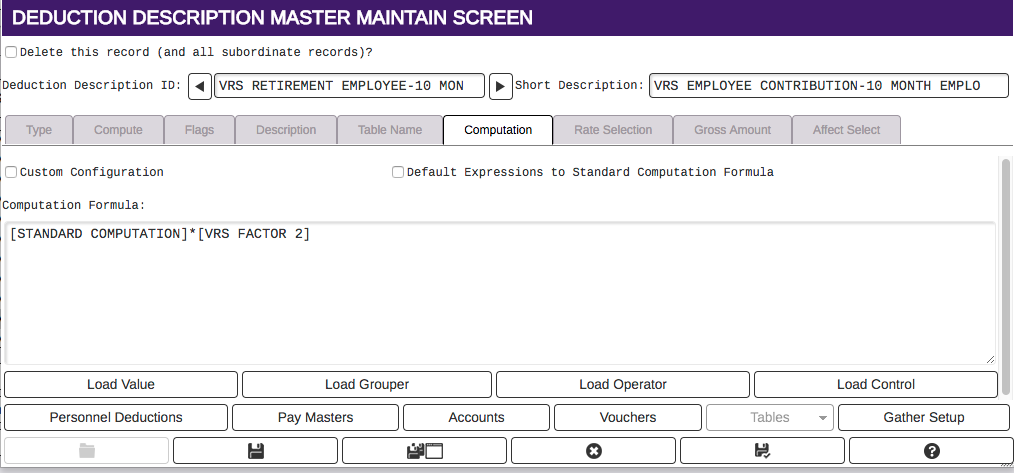
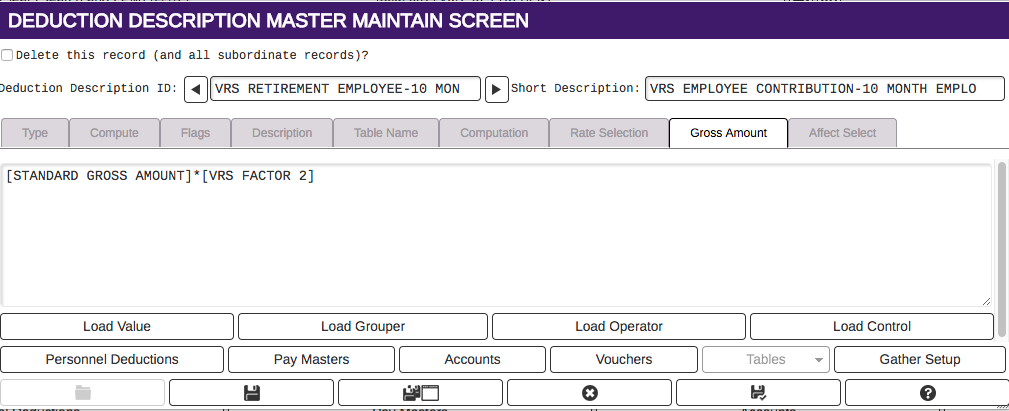
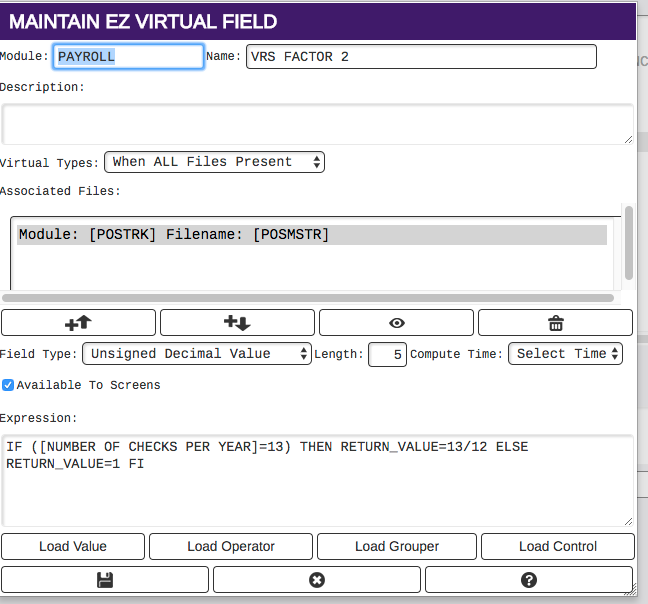
It was found with this set up that secondary jobs that are paid for 13 pay employees also have to have a Gross ID with the number of pays as 13. If not, the deduction gross for some of the VRS deductions is not the correct gross.
Fauquier/Smithfield/BuenaVista Gov all needed a different set up where their pay frequency is 26 but all VRS needs to compute by 24. We can set up the VRS FACTOR to read:
IF ([NUMBER OF CHECKS PER YEAR]=26) THEN RETURN_VALUE=26/24 ELSE RETURN_VALUE=1 FI
The retirement deductions can have the same standard expression most VA customers are using that looks at retirement salary.
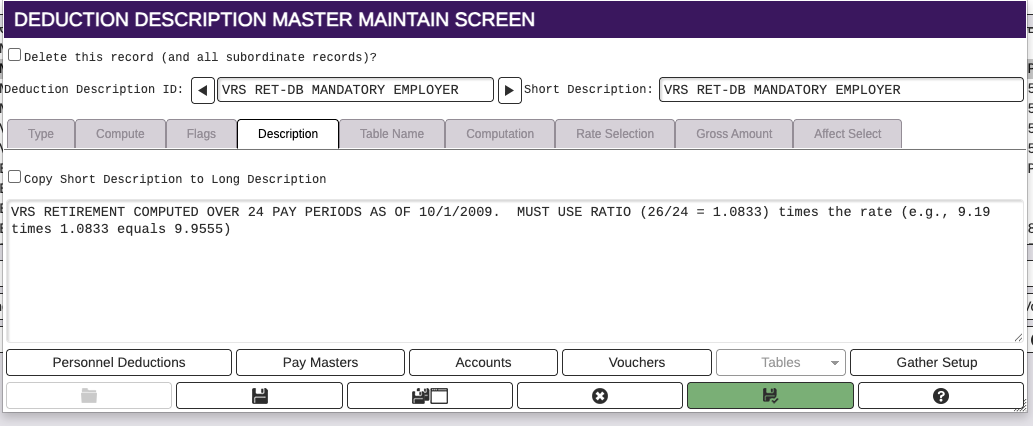
The Rate amount on the compute tab will also need to be adjusted: