
Main Page → Bank Reconciliation → Documentation → Maintenance → Undo Charge Distribution / Clearing
Contents
|
What This Process Does
- This process report will update the account year master record by transferring the service charge amount from the distributed column to the undistributed column.
- The distributed flag in the service charge record will be set to false.
- Reversing activity is created that will need to be Posted to Financial Management.
Best Practices
- Not Updated – The service charge must not have been updated in order to be undistributed. Undo Charge Audit Trail
- Distributed – The service charge must have been distributed in order for the distribution process to be undone.
Undo Charge Distribution / Clearing
- Finance → Bank Reconciliation → Maintenance → Undo → Charge Distribution / Clearing
- If you wish to unclear the service charge(s) along with un-distributing it, set the Undo Clear Flag in Charges boolean to true.
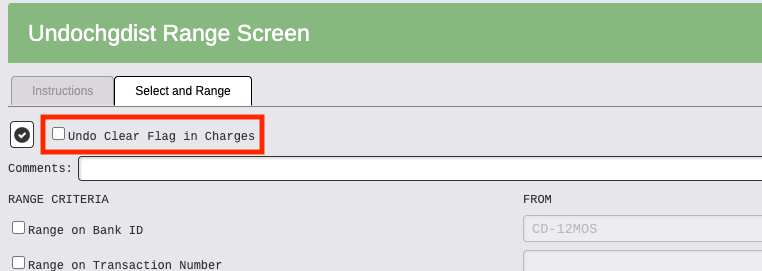
- Range accordingly. Transaction Numbers are from Bank Rec module. When the appropriate range fields are populated, click Run/Print Report.
- The Undo Service Charges Distribution Report appears. Review the report for accuracy.
- If correct, click Cancel and set your flags.
| FIELDS | Opt. | Rec. | Req. | Description |
|---|---|---|---|---|
| Undo Clear Flag in Charges | ♦ | — | — | Set this boolean to true if you wish to unclear the service charge(s) |
| Range Criteria | ♦ | — | — | Range accordingly |
| Opt. = Optional Rec. = Recommended Req. = Required | ||||
If you are Editing the Charge, make changes needed, Re-run Audit Trail (source user only), Distribute, Post, Update Bank Balance
If you get and Error Message about an account definition type, go to the COA and make sure each account has a Reference Type.
ex: this balance sheet code 12-10100 did not have a reference type. CASH was added
