
Please add any tips and tricks to commonly asked Support questions
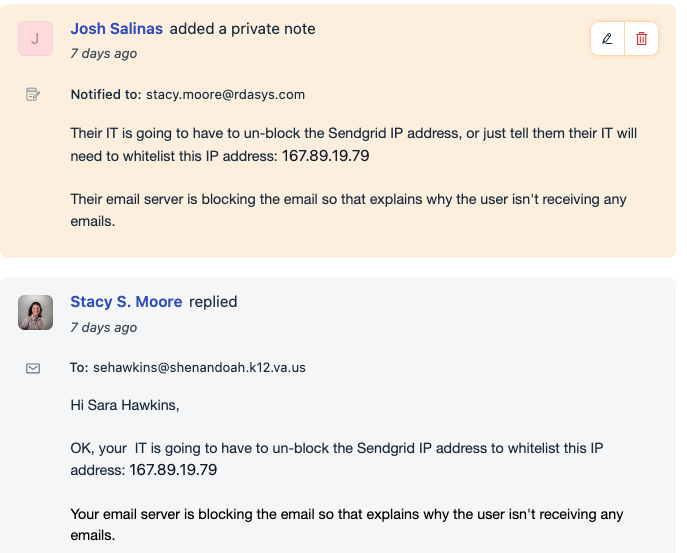
ISSUE: PO Approvers are not getting emails that PO's are ready to approve. See Ticket #123043. This is a lengthy ticket that Stacy/Josh worked on together. Here is resolution once Josh traced one of the emails and noticed that it was being bounced back from the customer's server.
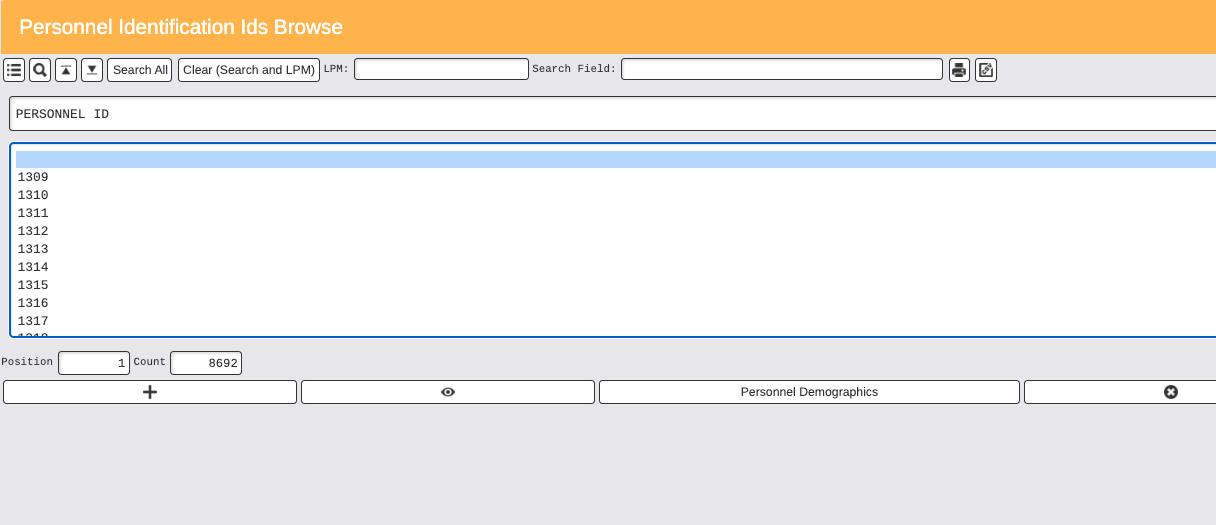
Issue: I AM TRYING TO ADD A NEW PERSONNEL AND I CAN NOT GET THE PERSONNEL ID TO POPULATE.
We have found that somehow there can be a blank personnel record saved. If you select the blank one and then delete that they are able to populate the next personnel ID
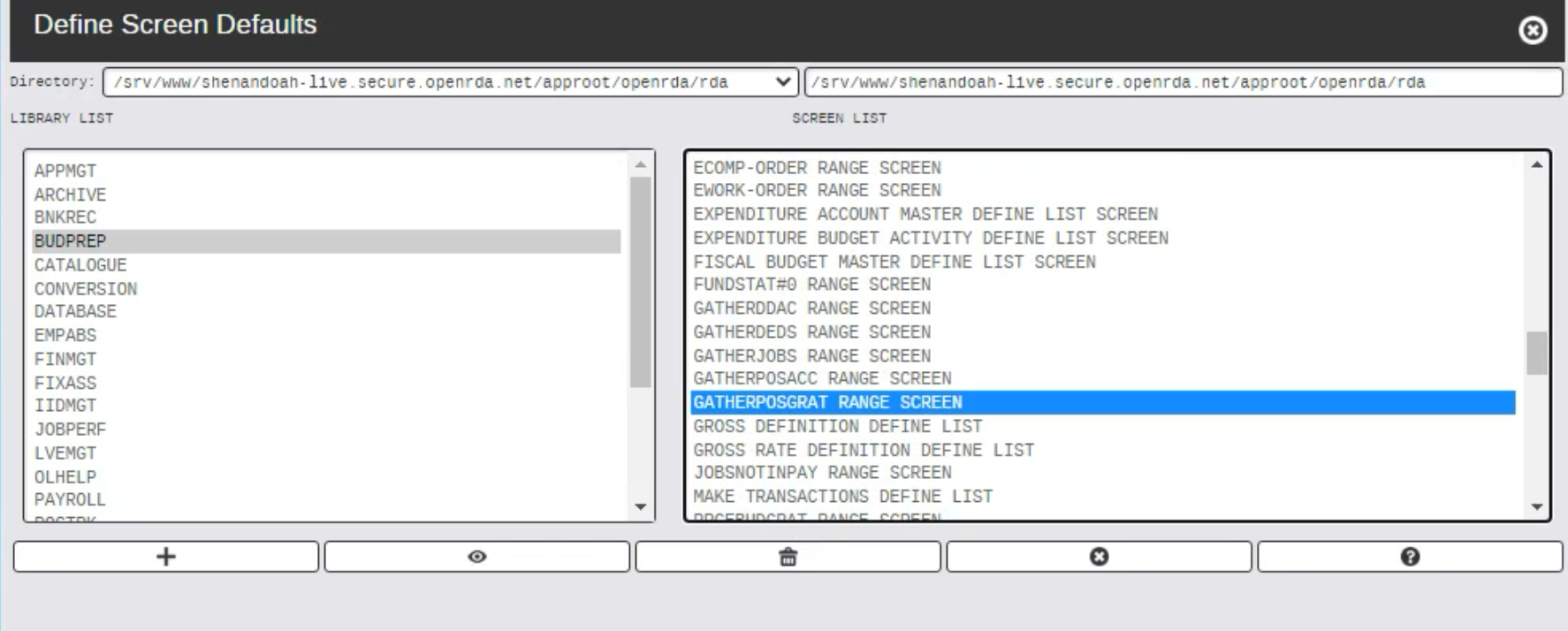
Issue: I am not able to gather "gross id's and gross rates" into fiscal year in Budget Prep
You have to clear screen defaults in order for this process to run. Development is aware
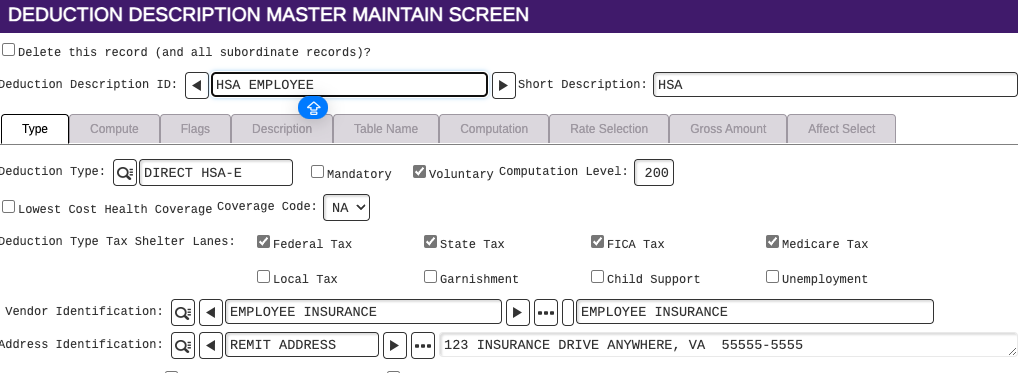
Issue: Direct Deposit HSA is computing for jobs that have a Gross ID that is Mandatory Only plus Direct Deposit
Since the Gross ID Deduction schedule includes Direct Deposit, any Deduction Type where the first 10 characters is DIRECT DEP, the system recognizes that Deduction Description as a direct deposit. Therefore, will compute with this type of Deduction Schedule.
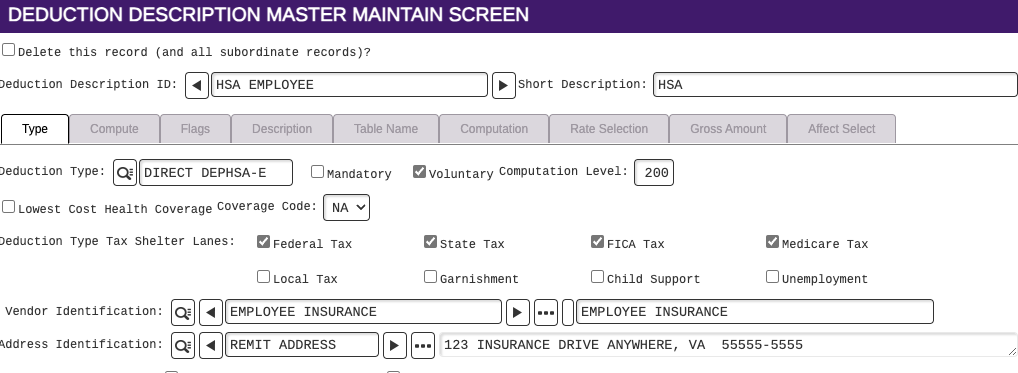
The Deduction Type DIRECT HSA-E and DIRECT HSA-R will not include this deduction on jobs that have a Gross ID Deduction schedule of Mandatory plus Direct Deposit because it doesn't follow the requirement of first 10 characters as DIRECT DEP so it's not recognized as a direct deposit when it comes to the deduction schedule, but the deduction will still be a direct deposit.
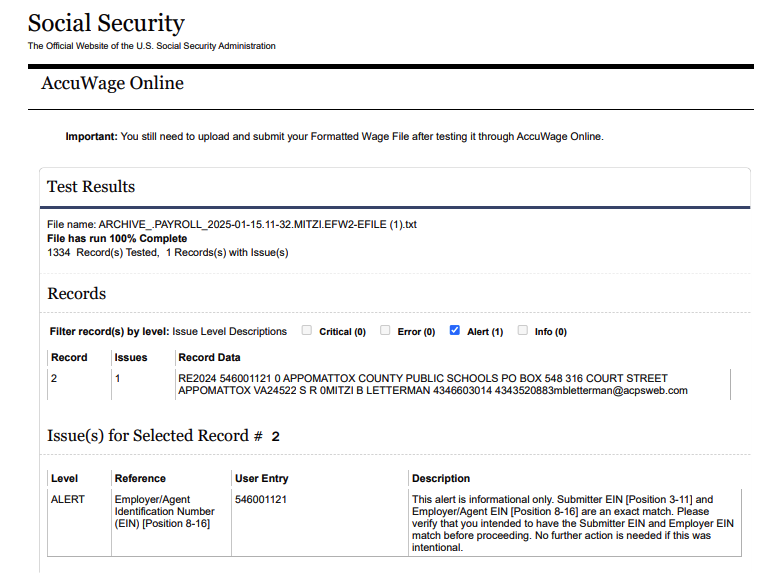
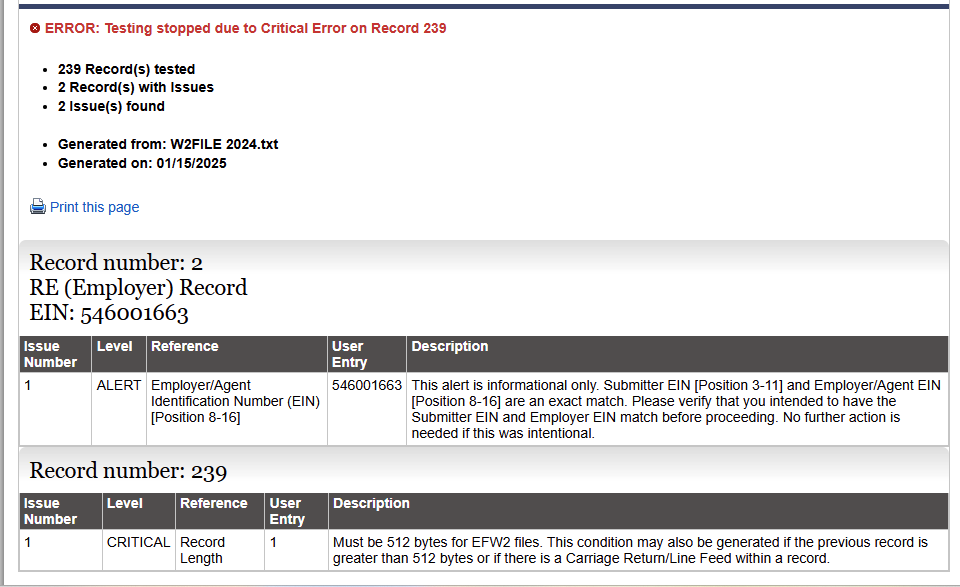
ISSUE: ACCUWAGE Error messages and solutions
1. This error is information only and does not affect the upload to the BSO site.
2. This error needs to be corrected by a developer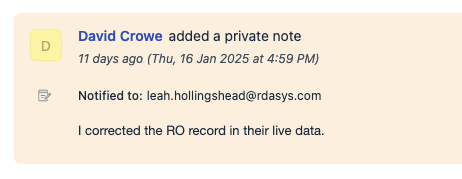
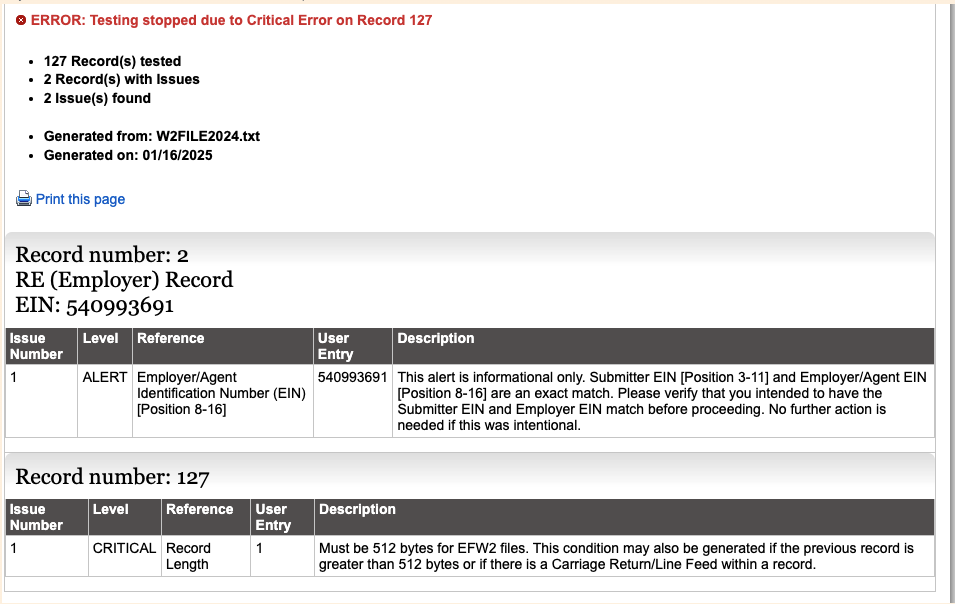
3. This error needs a developer to correct
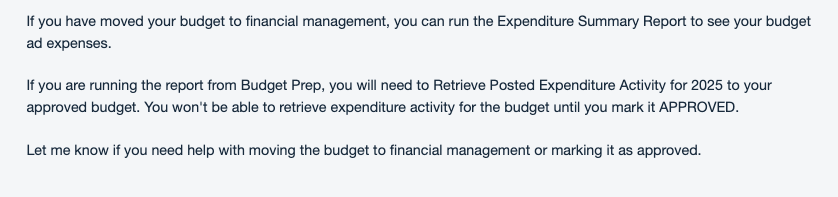
ISSUE: HOW DO I PRINT MY FY2025 BUDGET AND TO SHOW EXPENDITURES TO DATE?
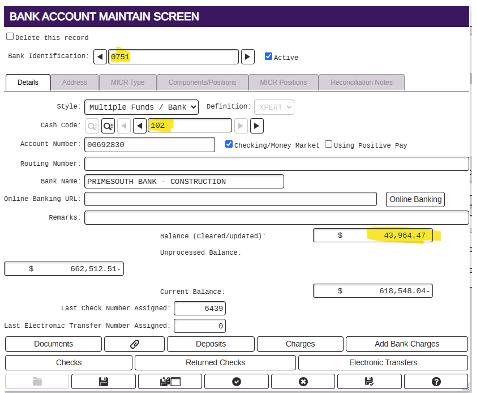
ISSUE: What are the unprocessed amounts on the bank reconciliation report?
That unprocessed balance is all of the outstanding items (as of today) in the bank account. So the current balance is the reconciled balance and then that unprocessed amount is the total of the checks and deposits, etc that are outstanding.
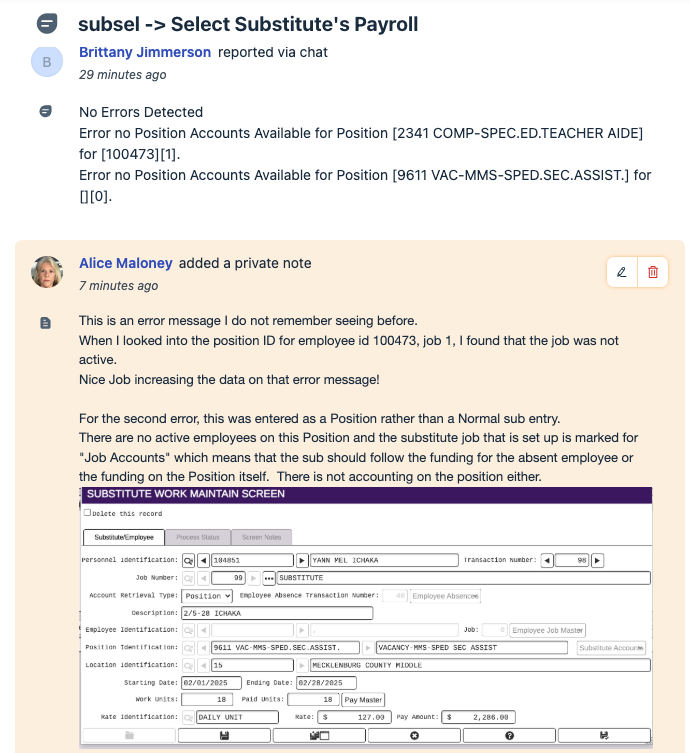
ISSUE: Select Substitutes into payroll - error message
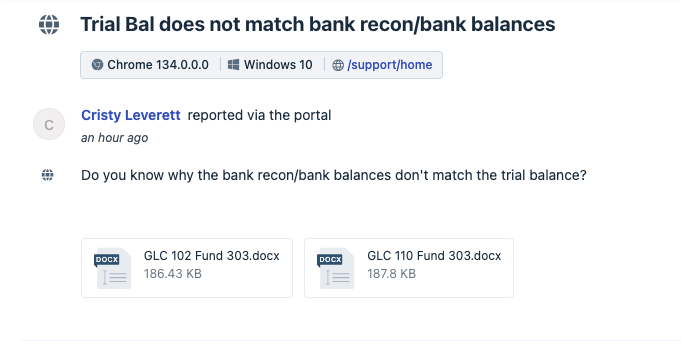
ISSUE: TRIAL BALANCE question

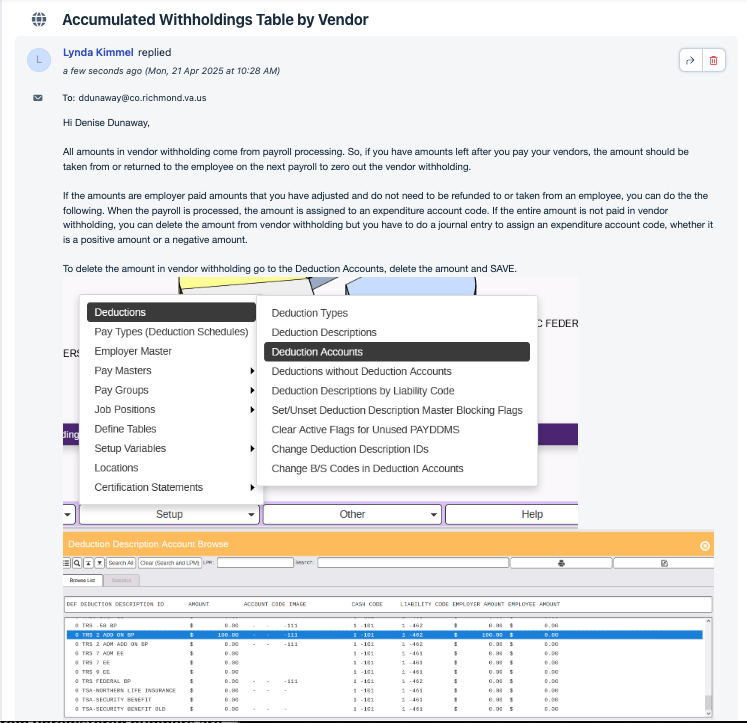
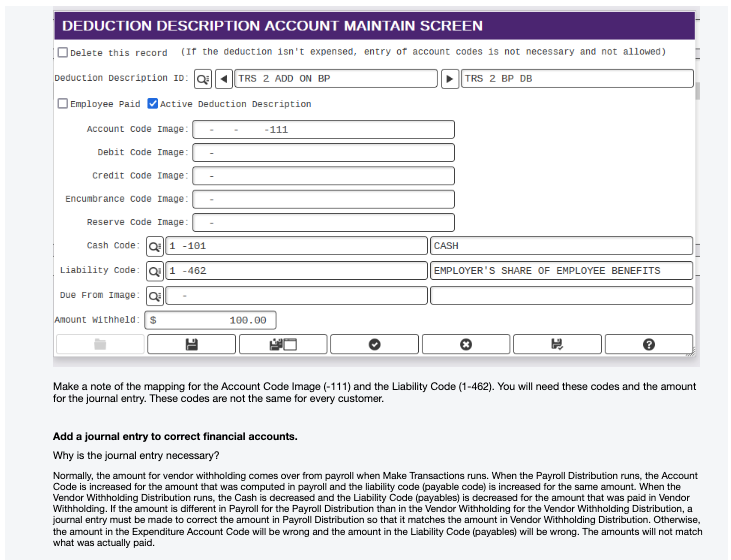
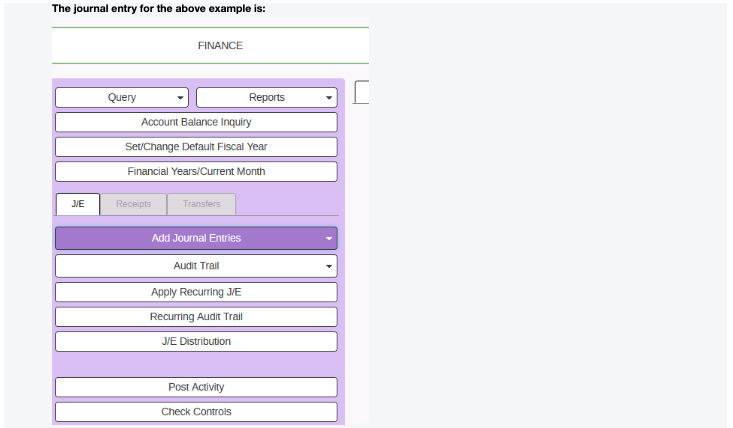
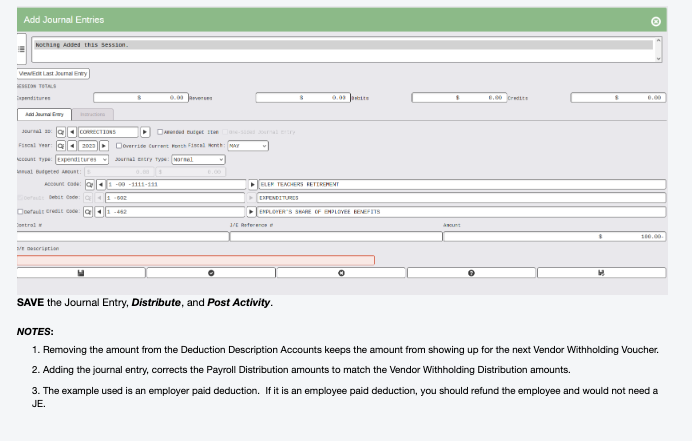
ISSUE: how to clear the amounts showing under the accumulated withholdings table by vendor in Payroll Vendor Withholding Module
Solution:
ISSUE: In ESS when client opens up the employee table view, they get a blank list and have to query the employee they need to see. Why doesn't the employee table open with data in it?
Solution:
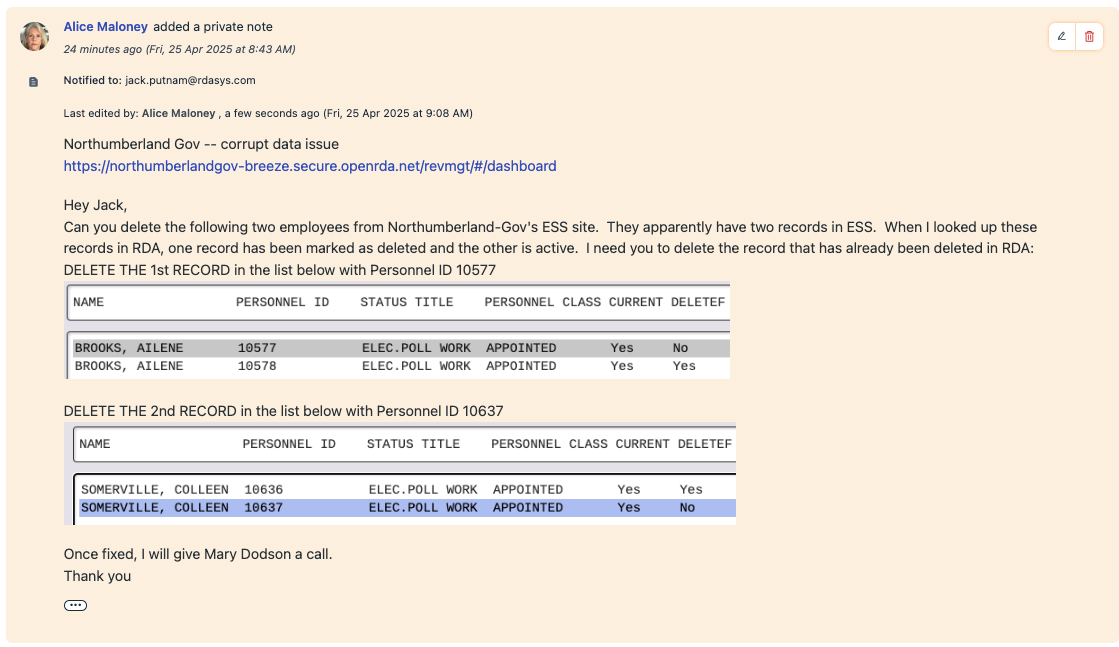
The most common reason is that the ESS table cannot have duplicate records with the same SSN. When this happens, it is called ESS data corruption and Jack Putnam needs to remove the duplicated record.
You will need to run the "check for corrupted employees" process in ESS on the dashboard.
The report looks like this:

You will need to go to RDA Personnel Demographics and find these records. If there are two records, you will need to tell Jack which record needs to be deleted and which records needs to stay in ESS.
ISSUE: Employee has 2 entries on the Direct Deposit Report but only one of the transactions has a DD number and DD date.
SOLUTION: Go to the Payroll ID menu and select Job Pay - Jobs. On the Browse screen, find the employee that is missing a DD number and add the DD number and the DD date to the screen and save it. The client cannot do this. It can only be done by someone logged in as rdacron.
Lunenburg has had this issue on their Food Service payroll for a while and this is the fix from David Crowe.
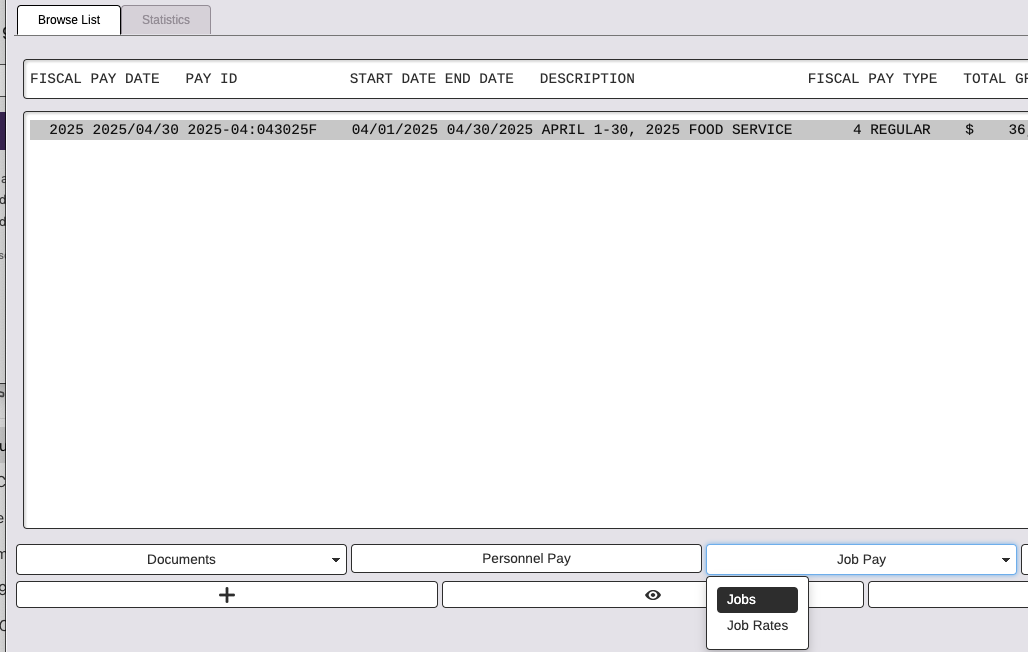
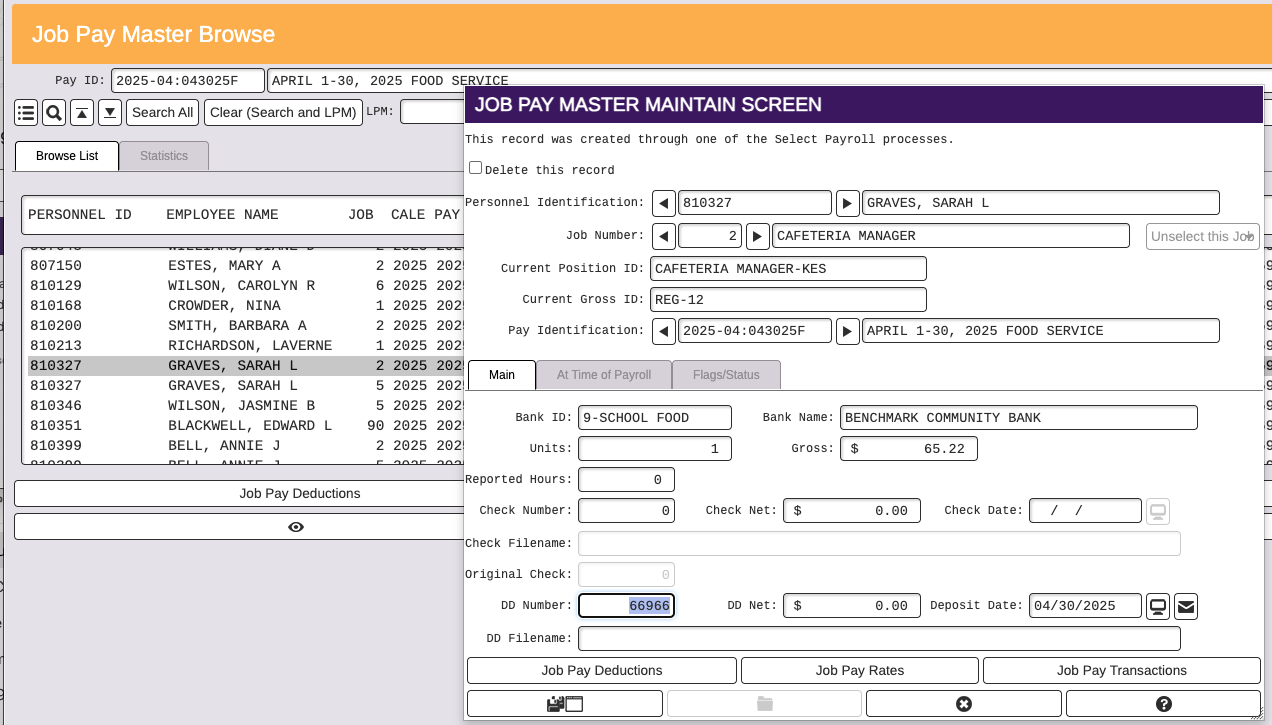
ISSUE: Client re-issued 2 vendor vouchers in procurement and then found out that the original 2 checks issues were actually cashed by the vendor. Now the re-issued checks need to be deleted and the original 2 checks need to be re-activated. Currently RDA Procurement does not have an undo re-issue process or an undo void voucher process.
SOLUTION:
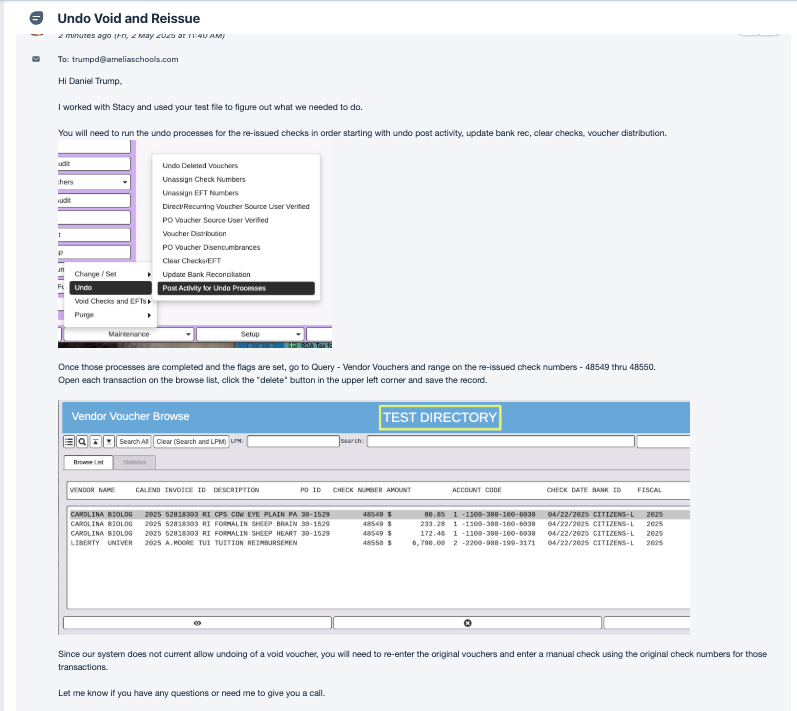
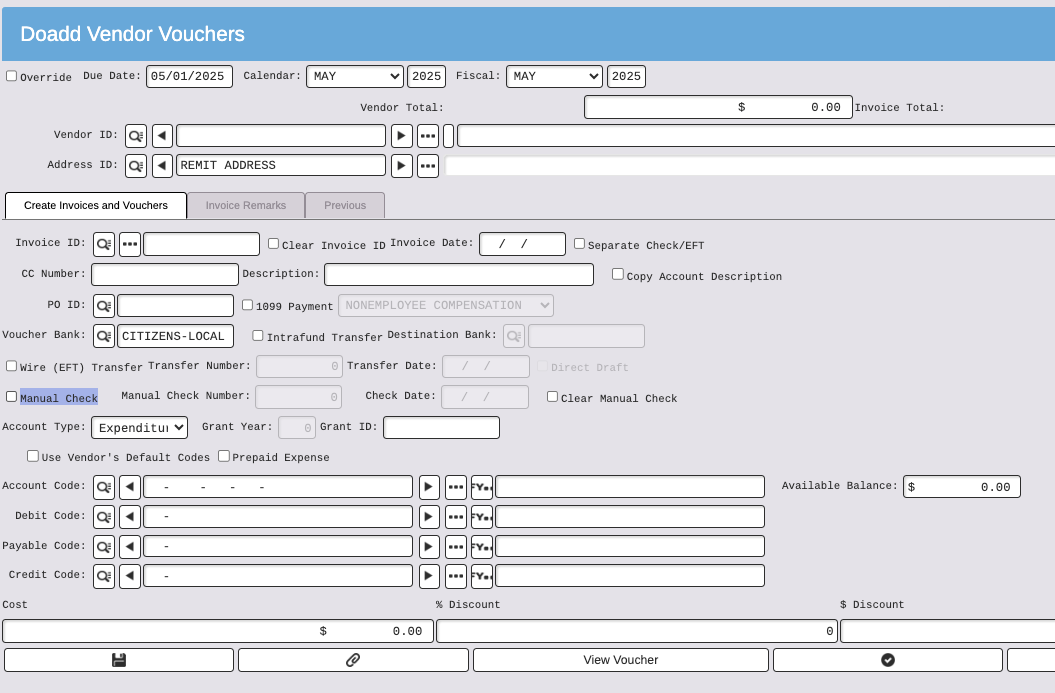
To issue the manual check, use the normal add voucher process and check the box that indicates "manual check".
- check register/update Bank Recon
- Clear
- Distribute
- Post
Issue: Employee's direct deposit was returned for incorrect bank account.
SOLUTION: Go to employee's direct deposit deduction and enter the correct account number and save. Then run a new Direct Deposit file ranging on the Personnel ID. Posting date must be today's date or later. No changes are needed on the payroll side because all history is correct. The Direct Deposit file will pick up the account number and routing number that is currently set on the Direct Deposit Deduction. The bank will return the funds to the employer for the returned direct deposit.
Issue: I want a report that will annualize salary even when the year is not completed.
SOLUTION: Payroll ➝ Reports ➝ General Payroll Info ➝ Job Pay Reports ➝ Total Select Pay w/Contract and Annual Gross. The report requires a Pay ID and will use the Salary from the pay to annualize the period gross.
Issue: The 941 forms do not match the W3 Employer totals for W2s.
SOLUTION: If the client is running the 941 Form in RDA, the liabilities populate from processed payrolls and the deposits populate from Vendor Withholding vouchers. Run the Deduction Pay Masters vs Calendar Comparison report under the Final Validation reports in Payroll on the Conclude tab on the left task menu. This report will show if any adjustments were entered during that calendar year that could affect the differences. If the employee and employer FICA and Medicare wages don't match, this can cause a difference when checking the Consolidated Tax Report against the 941s. The Consolidated Tax Report will report the employee paid wages for FICA and Medicare while the 941 form pulls the employer paid wages for FICA and Medicare.
TROUBLESHOOTING:
Mecklenburg has had this issue many times over the last year. This ticket includes lots of discussion with David Crowe on how we resolved this ticket. Below, are the condensed steps that were used to resolve the issue today (04/20/2026)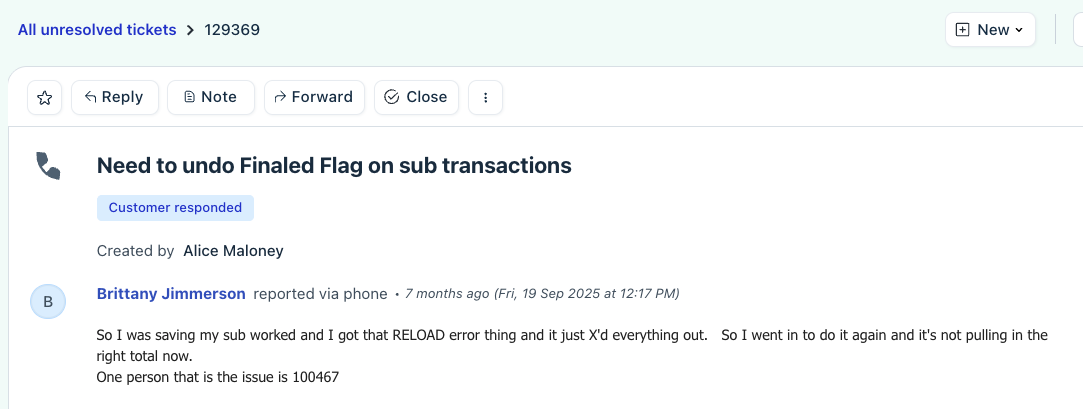 the first step is to identify which sub work transactions are causing the error.
First I queried in the Substitute Management Module - Query - Sub Work and ranged on starting date of 03/01/2026 thru 03/31/2026 and selected finaled true and false. This query should include all of the subs to be paid for the April payroll so that you can check the total sub amount to be paid to be sure you have isolated all of the sub work transactions.
The next step was to go to the spyglass at the top for the query you have already run and take off the Finaled Flag FALSE. We are looking for the sub work transactions where the finaled flag was not removed properly when the select subs undo process was run in the Payroll Module.
Now that you have isolated the transactions causing the error, set a "cookie" (Dev License) and manually unset the Finaled Flag.
The Second step is to identify the Sub Pay transactions associated with those Sub work transactions that you just deleted.
Now go to Substitute Management Module - Query - Sub Payments and range on Personnel ID of the employee you identified in step 1 and also range on Pay ID. The browse should show the same problem transactions that you saw in the first step when you queried sub work transactions.
Now that you have isolated the transactions causing the error, set a "cookie" (Dev License) and open each record to manually set the "delete this record" flag in the upper left corner and save the changes. REMINDER: you may need to log in as rdacron to be able to set the cookie and make the changes. It depends on how the change was made by development whether they apply to individual logins or only rdacron.
Now, you can go back to the Payroll module and Pay in Mass - Select Substitutes and you should have the correct group of subs with the correct payment amount.
Issue: The Payroll Direct Deposit File screen does not show a Bank ID. Instead it shows No PAYROLL BANK IDENTIFICATIONS List Available.

SOLUTION: The Bank in the Bank Rec module did not have a cash code associated with the bank and it wasn't checked as a Checking Account. Once those were fixed, the Bank ID showed on the Direct Deposit file screen. This is most common for new implementation clients that have not run a live payroll yet.

Managed Position Boolean on Job Master
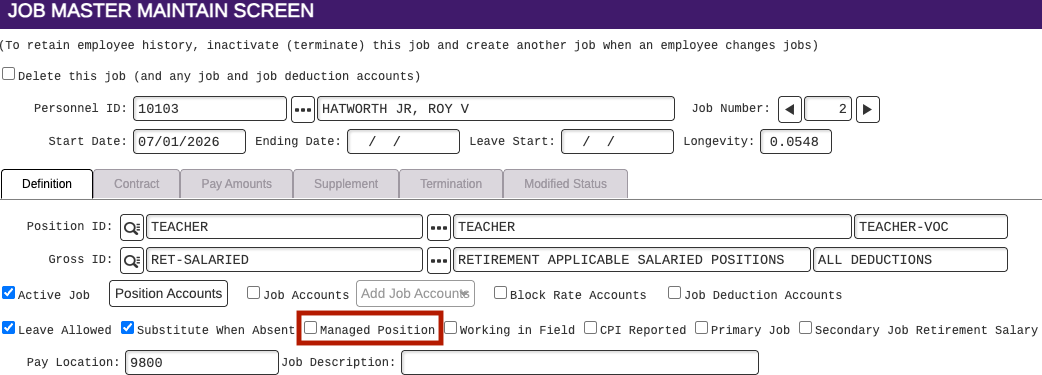
- This boolean is controlled by the Payroll GSV setting "Allow PAYJMST to Manage TOTAL FTE"
- If the GSV setting is marked as true (checked) the Managed Position boolean is not used and the FTE is controlled on the Job Master
- If the GSV setting is marked as false (unchecked) the Positions will have the Managed FTE boolean, and if checked, it will show as checked on the Job Master
- The end result is supposed to be where the FTE field cannot be edited/changed on the Job Master, however after testing through and consulting with Crowe, this is not working. I'm able to update the FTE on the job (LMH)
- The Position Personnel maintain screen can not be edited
- Considering if this boolean should be removed from the Job Master (7-23-26)
To split Job master pay by FTE:
Position Tracking - Setup - Rates - Rate Masters
Select SALARY rate
Check box Use FTE and save.
Issue: Taxable Gross for taxes are more than gross pay and employee has INS>50K.
SOLUTION: Federal, State, FICA, FICA-M, Medicare, and Medicare-M gross is increased by the INS>50K amount withheld. To calculate the tax gross, add up all pre-tax deductions and subtract from gross pay. Then add the INS>50K amount withheld should equal the tax gross. The Sheltered column will show the amount adjusting the gross to the taxable gross. INS>50K amount will show as a negative such as 2.70- but the way this deductions works, it's actually adding that amount to the tax gross amount.
Issue: When user runs Trial Balance, this error is produced below. (https://rdasystems.freshdesk.com/a/tickets/135967)
Error Encountered Looking for [0 001-001-00003031] in File [FINMGT][FINBACC] using Key [ACCOUNT CODE KEY] Error Encountered Looking for [0 006-001-00003031] in File [FINMGT][FINBACC] using Key [ACCOUNT CODE KEY] Error Encountered Looking for [0 008-001-00003031] in File [FINMGT][FINBACC] using Key [ACCOUNT CODE KEY] Error Encountered Looking for [0 010-001-00003031] in File [FINMGT][FINBACC] using Key [ACCOUNT CODE KEY] Error Encountered Looking for [0 012-001-00003031] in File [FINMGT][FINBACC] using Key [ACCOUNT CODE KEY]
SOLUTION:
At the bottom of the Balance Sheet Accounts Year Search Browse, click on Expression and enter this expression.
To fix, you could turn off inactive years on the range screen. I don't see activity under it, which means it probably was created by an import. OR you could delete them. David created a MTN FINBYR.SEARCH.NOERROR maintain master definition to allow them to be deleted if you'd prefer.
If there is an error when saving the Balance Sheet Accounts Maintain screen, such as trying to change the account code, it means the maintain screen is reformatting the account code such that the original is being truncated for the screen and what is saved isn't the real original account code. That means it can only be deleted with a report or import/export. David used a report to mark them as deleted.