
Adding new account codes using Breeze processes in RDA.
Steps to Add New Account Code
1. Add new account code in RDA Financial Management
Finance ➝ Setup ➝ Account Masters Setup ➝ Add COA-Based Accounts or Add Non-COA Based Accounts (Based on setup)
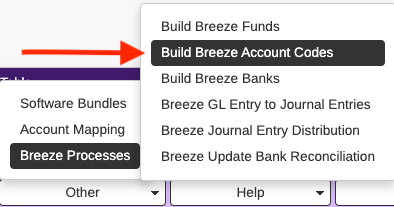
2. Once account is setup in RDA, go to Other ➝ Breeze Processes ➝ Build Breeze Account Codes
Once the menu item is engaged, the process will run immediately.
3. Log in to the Revenue Management Site and go to the Admin Dashboard (red cog icon) and click on Index Accounting Codes. The process will run for about a minute. The Process Information window will indicate when the process is complete.
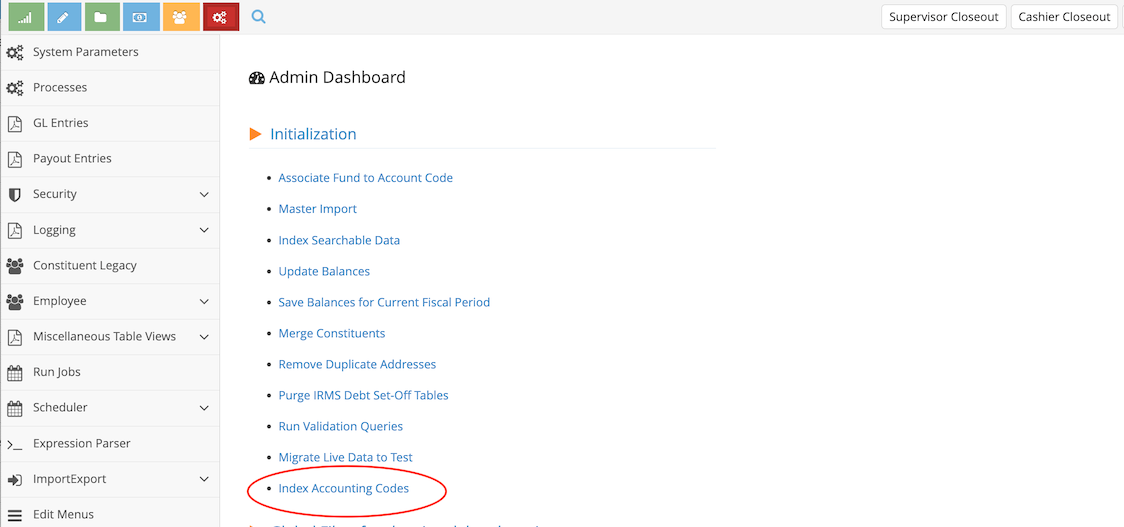
4. Account code is now available to search and select.