
Disabling Portal to display maintenance message to prevent activity.
Steps to Disable Portal
1. Go to Admin Dashboard (red cogwheel icon).
2. Click on System Parameters in left menu.
3. Click the 3 dots beside first column named ID and choose Filter
3. In the space under "Is equal to", enter 245 and click on Filter button at the bottom. This will display only 245.
4. Left click on the 245 record to select it.
5. Right click on that record to view Edit System Parameter. Click on that option.
6. The Edit SystemParameter box will open which is shown below. Click the box that reads Value, to select that setting.
7. Click Save at the bottom.
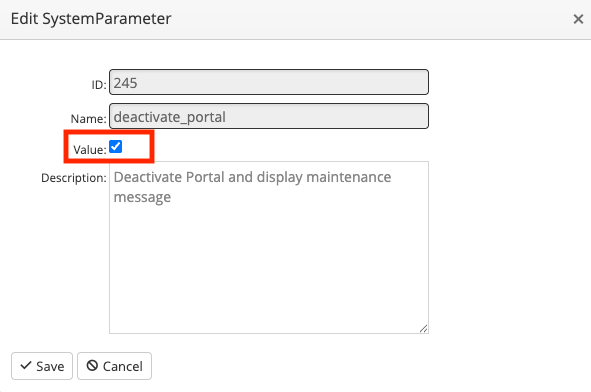
To activate the 245 System Parameter, follow steps above and on step 6, uncheck the Value box and save.